
How to Create Bull Transition, Bear Transition and Master Transition Alerts
AKMelytics – Market Intelligence can be used with TradingView alerts to notify you when selected market conditions are detected.
Instead of watching every chart continuously, you can configure AKMelytics to monitor specific conditions and let TradingView notify you when those conditions occur.
The latest AKMelytics version introduces a cleaner transition-based alert system built around three primary alerts:
AKMelytics Bull Transition
Notifies you when AKMelytics confirms a new transition into a bullish market cycle.
AKMelytics Bear Transition
Notifies you when AKMelytics confirms a new transition into a bearish market cycle.
AKMelytics Bull / Bear Transition
This is the recommended Master Alert.
It monitors both Bull and Bear transitions using one TradingView alert.
When either transition occurs, the alert is triggered.
Understanding AKMelytics Transition Alerts
AKMelytics does not repeatedly generate a Bull or Bear Transition on every candle while the same directional environment remains active.
A transition is intended to identify a change in market cycle.
For example:
Neutral → Bull
may generate a Bull Transition.
Bear → Bull
may generate a Bull Transition.
Likewise:
Neutral → Bear
may generate a Bear Transition.
Bull → Bear
may generate a Bear Transition.
Once the transition has occurred, ordinary directional conditions continue to be displayed through AKMelytics alignment markers rather than repeatedly printing new transition labels. This is intentional in the current engine design.
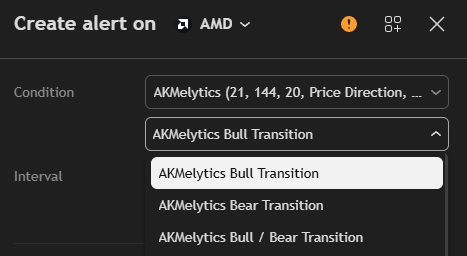
AKMelytics master alert
The Three Primary Transition Alerts
1. AKMelytics Bull Transition
Select:
AKMelytics Bull Transition
when you only want TradingView to notify you when a new bullish transition occurs.
The current alert message is generated when the Bull Transition is confirmed at bar close.
Best suited for
- Long-biased traders
- Bullish watchlists
- Trend-reversal monitoring
- Bullish cycle changes
- Identifying potential new bullish market conditions
After receiving the alert, open the chart and review:
- AKM direction
- Market Flow Ribbon
- Market structure
- Volume participation
- Relative strength
- Target Lvl
- Risk Lvl
The alert tells you that a transition has occurred.
It does not tell you that you must enter a trade.
2. AKMelytics Bear Transition
Select:
AKMelytics Bear Transition
when you want to monitor only new bearish transitions.
The Bear Transition is generated when AKMelytics confirms a change into its bearish cycle.
Best suited for
- Bearish market monitoring
- Exit-risk awareness
- Short-biased analysis where applicable
- Detecting deterioration in previously bullish conditions
- Watching for bearish cycle changes
After receiving the alert, review:
- Negative AKM momentum
- Bearish Market Flow
- Distribution
- Bearish BOS or CHoCH
- Nearby support
- Target Lvl
- Risk Lvl
3. AKMelytics Bull / Bear Transition — Recommended Master Alert
For most users, this is the most important alert:
AKMelytics Bull / Bear Transition
This single condition triggers whenever either:
Bull Transition
or
Bear Transition
occurs.
The current code combines the two transition events into one TradingView condition specifically so users can monitor both directions with a single alert.
Why we call this the Master Alert
Instead of creating:
- One Bull alert
- One Bear alert
you can create one:
AKMelytics Bull / Bear Transition
This becomes your primary high-level market-cycle alert.
For users who want the simplest setup, I recommend starting with this alert.
Recommended Beginner Alert
Master Setup
Create:
AKMelytics Bull / Bear Transition
Frequency:
Once Per Bar Close
That gives you one high-level alert monitoring both major transition directions.
You can later add more specialized alerts for alignment, continuation and market structure.
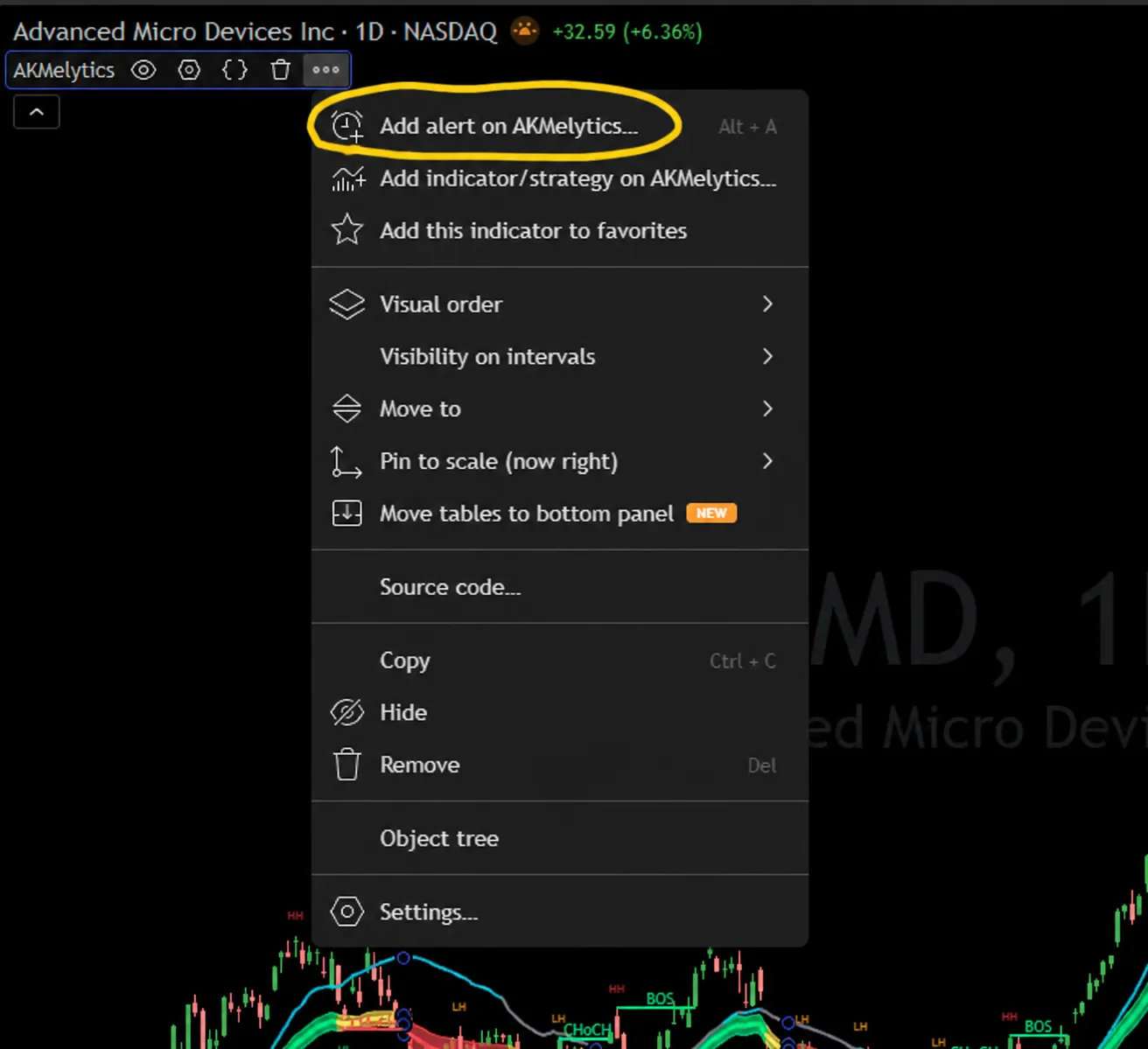
add alert on akmleytics
How to Create the Master AKMelytics Alert
Open the chart you want to monitor.
Then:
- Add AKMelytics – Market Intelligence to the chart.
- Select your preferred timeframe.
- Click Create Alert.
- Under Condition, select AKMelytics.
- Open the second condition menu.
- Select AKMelytics Bull / Bear Transition.
- Set the alert frequency to Once Per Bar Close where available.
- Choose your notification method.
- Give the alert a recognizable name.
- Click Create.
A useful alert name is:
AMD – Daily – AKM Bull/Bear Transition
or:
AAPL – 4H – AKM Master Transition
What Your TradingView Menu Should Show
In the latest AKMelytics build, the alert menu includes:
AKMelytics Bull Transition
AKMelytics Bear Transition
AKMelytics Bull / Bear Transition
The third option is the one to choose if you want the Master alert.
Why Once Per Bar Close Is Recommended
AKMelytics transition events are designed around confirmed bar conditions.
While the current candle remains open:
- Price can change
- Volume can change
- AKM can change
- Market Flow can change
- A developing breakout can fail
Waiting for the bar to close provides a more stable signal for users who prefer confirmed conditions. The previous guide also recommends bar-close alerts for this reason.
Transition Alert vs Alignment Alert
These are different.
Transition Alert
Answers:
“Has AKMelytics identified a change in the broader market cycle?”
Examples:
- AKMelytics Bull Transition
- AKMelytics Bear Transition
- AKMelytics Bull / Bear Transition
These are higher-level events.
Alignment Alert
Answers:
“Are specific directional components currently aligned?”
The latest script also provides:
AKMelytics Bullish Alignment
This is triggered when the price, MA framework, AKM and Market Flow conditions satisfy the bullish alignment structure.
AKMelytics Bearish Alignment
This represents the bearish equivalent.
These alerts are separate from the transition engine.
Bullish Alignment Confirmation
AKMelytics also provides:
Bullish Alignment Confirmation
This reflects the wider bullish confirmation architecture.
It can incorporate different bullish pathways such as:
- Trend condition
- Early bullish condition
- Bullish confluence
- Market Flow qualification
- Optional MA filtering
The final bullish confirmation engine combines multiple branches rather than relying on one individual condition.
Bearish Alignment Confirmation
The bearish equivalent is:
Bearish Alignment Confirmation
It reflects confirmed bearish alignment under the AKMelytics bearish architecture.
The bearish engine mirrors the bullish framework using:
- Bearish trend conditions
- Distribution
- Bearish confluence
- Negative or permitted neutral Market Flow
- Bearish candle confirmation
- Optional MA filtering
Positive Flow Alerts
Users who want earlier or more specific monitoring can also use the individual Market Flow alerts.
These include:
Positive Flow + Bullish Trend
Positive Market Flow and bullish trend conditions are aligned.
Positive Flow + Early Bullish Condition
Positive Market Flow is present together with an early bullish condition.
Positive Flow + Bullish Confluence
Positive Market Flow is combined with the bullish confluence engine.
Neutral Flow + Early Bullish Condition
An early bullish condition is forming while Market Flow remains neutral or transitional.
These alerts are more specialized than the Bull Transition.
They are particularly useful for watchlist monitoring.
Negative Flow Alerts
AKMelytics also provides the bearish equivalents:
Negative Flow + Bearish Trend
Negative Flow + Early Bearish Condition
Negative Flow + Bearish Confluence
Neutral Flow + Early Bearish Condition
These can help traders monitor deteriorating market conditions before or during a confirmed Bear Transition.
Bullish Continuation Alert
The Bullish Continuation alert is designed for potential continuation opportunities after an existing bullish setup.
The current Bullish Continuation logic requires a previous valid bullish event and then evaluates a retracement back toward the Market Flow Ribbon within a limited continuation window.
The alert can be useful when:
- A Bull Transition has already occurred
- Price subsequently pulls back
- Market Flow remains constructive
- Price interacts with the ribbon
- Bullish recovery develops
This is not the same as a new Bull Transition.
It represents a continuation opportunity within an existing bullish cycle.
Market Structure Alerts
The latest AKMelytics version also supports structure alerts.
These include:
Bullish BOS
Triggered when price closes above a confirmed structure high.
Bearish BOS
Triggered when price closes below a confirmed structure low.
Bullish CHoCH
Triggered when price closes above a confirmed Lower High while the previous structure was bearish.
Bearish CHoCH
Triggered when price closes below a confirmed Higher Low while the previous structure was bullish.
These alerts are useful for traders who want to combine AKMelytics transitions with market-structure confirmation.
Structure Fibonacci Alerts
AKMelytics also contains alerts associated with its Structure Fibonacci engine.
These include:
- Bullish Structure Fibonacci Activated
- Bearish Structure Fibonacci Activated
- Bullish Structure Fibonacci Invalidated
- Bearish Structure Fibonacci Invalidated
These are advanced alerts and are not necessary for a beginner setup.
Recommended Alert Hierarchy
I recommend thinking about the alerts in four levels.
Level 1 — Master Transition
Use:
AKMelytics Bull / Bear Transition
Purpose:
Detect major changes in the AKMelytics market cycle.
Level 2 — Directional Alignment
Use:
- AKMelytics Bullish Alignment
- AKMelytics Bearish Alignment
- Bullish Alignment Confirmation
- Bearish Alignment Confirmation
Purpose:
Monitor specific directional alignment conditions.
Level 3 — Continuation & Early Conditions
Use:
- Bullish Continuation
- Positive Flow + Bullish Trend
- Positive Flow + Early Bullish Condition
- Negative Flow + Bearish Trend
- Negative Flow + Early Bearish Condition
Purpose:
Monitor developing or continuation setups.
Level 4 — Market Structure
Use:
- Bullish BOS
- Bearish BOS
- Bullish CHoCH
- Bearish CHoCH
- Structure Fibonacci activation/invalidation
Purpose:
Monitor structural confirmation and potential trend transitions.
Recommended Alert Setup for New Users
For a simple setup, start with only:
1. AKMelytics Bull / Bear Transition
Your Master Alert.
2. Bullish Continuation
For bullish retracement opportunities.
3. Bullish BOS / Bearish BOS
For structural continuation.
4. Bullish CHoCH / Bearish CHoCH
For possible structural transitions.
This gives you useful coverage without excessive notifications.
Recommended Setup for Swing Traders
For a swing-trading workflow, consider:
Daily chart
AKMelytics Bull / Bear Transition
plus:
Daily BOS / CHoCH
Then use:
4-Hour chart
for additional entry analysis.
The workflow becomes:
Daily Master Transition
↓
Review Daily Market Flow
↓
Review Daily Market Structure
↓
Move to 4H
↓
Review AKM + Alignment
↓
Review Target Lvl / Risk Lvl
↓
Decide whether the setup fits your trading process
Example: Bull Transition Alert
Imagine AMD has been in a weak or bearish environment.
AKM begins improving.
Market Flow improves.
Bullish alignment develops.
A qualifying bullish activation occurs after the previous Bull cycle has already been reset.
AKMelytics then prints:
Bull
on the transition candle.
If you created:
AKMelytics Bull Transition
you receive a bullish notification.
If you created:
AKMelytics Bull / Bear Transition
you receive the same event through your Master alert.
Example: Bear Transition Alert
Suppose the same stock later deteriorates.
Market Flow turns negative.
Bearish structure develops.
A qualifying bearish activation occurs.
AKMelytics prints:
Bear
on the transition candle.
The Bear Transition alert triggers.
If you are using the combined Master alert, the same alert setup detects this event automatically.
Why the Transition Label Does Not Stay on Every Candle
This is deliberate.
The current transition engine treats Bull and Bear as events, not permanently repeated labels.
The dashboard normally returns to Neutral outside the immediate transition display window rather than remaining permanently on Bull or Bear.
Therefore:
Do not expect a Bull Transition label on every bullish candle.
Do not expect a Bear Transition label on every bearish candle.
The label marks the transition event itself.
What to Do After Receiving a Bull Transition
Open the chart and review:
AKM
Is momentum positive and strengthening?
Market Flow
Is the ribbon bullish or improving?
Structure
Has Bullish CHoCH or BOS occurred?
Moving Averages
Is the MA framework supportive?
Participation
Are volume and accumulation improving?
Target Lvl
Where is the projected upside reference?
Risk Lvl
Where is the current risk reference?
Only then decide whether the setup fits your own trading plan.
What to Do After Receiving a Bear Transition
Review:
- Negative AKM
- Bearish Market Flow
- Bearish MA structure
- Distribution
- Bearish BOS / CHoCH
- Nearby support
- Target Lvl
- Risk Lvl
A Bear Transition tells you that the directional cycle has changed according to AKMelytics.
It does not guarantee further downside.
Why a Transition May Not Trigger Again
Suppose AKMelytics has already produced a Bull Transition.
If bullish conditions continue for another 20 candles, the system does not need another Bull Transition.
The Bull cycle has already been registered.
A fresh Bull Transition becomes possible only after the previous bullish cycle has been reset through opposite or neutral conditions. This behavior is explicitly built into the transition engine.
This reduces repeated high-level signals.
Why This Is Different From a Normal Buy/Sell Alert
A normal directional indicator might generate repeated Buy signals every time a condition reappears.
AKMelytics instead separates:
Directional Alignment
from
Market Transition
This means:
Triangles and alignment markers can show qualifying directional conditions.
Bull and Bear labels are reserved for higher-level transition events.
Suggested Alert Names
Use:
AMD – Daily – AKM Master Transition
AAPL – Daily – AKM Bull Transition
NVDA – 4H – AKM Bear Transition
MSFT – Daily – AKM Bullish Continuation
AMZN – Daily – AKM BOS/CHoCH
A consistent format is:
Ticker – Timeframe – AKM Alert Type
Quick Alert Reference
| Alert | Purpose |
|---|---|
| AKMelytics Bull Transition | New bullish market-cycle transition |
| AKMelytics Bear Transition | New bearish market-cycle transition |
| AKMelytics Bull / Bear Transition | Master alert monitoring both directions |
| AKMelytics Bullish Alignment | Bullish price/MA/AKM/flow alignment |
| AKMelytics Bearish Alignment | Bearish price/MA/AKM/flow alignment |
| Bullish Alignment Confirmation | Broader bullish confirmation |
| Bearish Alignment Confirmation | Broader bearish confirmation |
| Bullish Continuation | Bullish retracement/continuation condition |
| Bullish BOS | Confirmed bullish structure break |
| Bearish BOS | Confirmed bearish structure break |
| Bullish CHoCH | Possible bearish-to-bullish structural transition |
| Bearish CHoCH | Possible bullish-to-bearish structural transition |
Best Setup if You Want Only One Alert
If you want the simplest possible configuration:
Condition: AKMelytics Bull / Bear Transition
Use it as your:
AKMelytics Master Alert
This gives you notification of both major directional transitions without needing separate Bull and Bear alerts.
AKMelytics Master Alert Workflow
AKMelytics Monitors the Chart
↓
Bull or Bear Transition Occurs
↓
Master Bull/Bear Transition Alert Triggers
↓
Open the Chart
↓
Review AKM
↓
Review Market Flow
↓
Review BOS / CHoCH
↓
Review Alignment
↓
Review Target Lvl & Risk Lvl
↓
Make Your Own Trading Decision
The alert tells you when the chart deserves attention.
The rest of AKMelytics helps you understand why.
Important After Changing Settings
If you change important AKMelytics settings, review your existing TradingView alerts.
Examples include:
- Fast MA
- Slow MA
- MA filters
- Benchmark
- Bullish / Bearish Alignment settings
- Continuation settings
- Market structure settings
For major indicator updates, recreating the alert is a good practice so the active TradingView alert corresponds with the latest installed version.
Common Alert Mistakes
Creating Separate Bull and Bear Alerts When You Only Need One
Use:
AKMelytics Bull / Bear Transition
if your objective is simply to monitor both major transition directions.
Expecting Repeated Bull Transition Alerts
Bull Transition is a cycle-transition event.
It is not supposed to fire continuously during the same bullish cycle.
Treating an Alignment Arrow as a Bull Transition
Alignment and Transition represent different levels of the AKMelytics hierarchy.
Entering Automatically After an Alert
An alert identifies a technical event.
It does not replace analysis.
Ignoring the Timeframe
A 1-hour Bull Transition and a Weekly Bull Transition describe very different market contexts.
Ignoring BOS / CHoCH
Market structure can provide valuable context around the transition.
Key Takeaway
The latest AKMelytics alert architecture is much simpler when understood as:
Alignment = directional conditions
Transition = higher-level cycle change
and:
AKMelytics Bull / Bear Transition = Master Alert
For most users, start with the combined Bull / Bear Transition alert.
Then add Alignment, Continuation and Market Structure alerts only when they support your own trading workflow.
AKMelytics alerts are designed to answer:
“When should I look at this chart?”
They should not be interpreted as:
“When must I enter a trade?”
For most users, the best workflow is:
Confirmed AKMelytics Alert
↓
Open the Chart
↓
Check AKM
↓
Check Market Flow
↓
Check Market Structure
↓
Check Volume & Participation
↓
Review Target Lvl & Risk Lvl
↓
Make Your Own Trading Decision
Alerts help reduce monitoring time.
The complete AKMelytics framework helps determine whether the alerted setup deserves further consideration.
Next Guide
Real AKMelytics Chart Examples
The next guide applies everything covered so far to practical market examples.
You will learn how to analyse:
- Bullish trend development
- Bearish trend development
- Bullish reversal
- Bearish reversal
- Pullback Bull setups
- Market Flow transitions
- AKM weakening
- BOS and CHoCH
- Failed setups
- Sideways markets
- Target Lvl and Risk Lvl
→ Continue to: AKMelytics Real Chart Examples
Previous Guide
← Market Structure, BOS & CHoCH Guide
Educational Use & Risk Disclaimer
AKMelytics alerts are technical notifications intended for research, monitoring and educational purposes.
An alert does not constitute financial, investment, trading or securities advice and does not instruct a user to enter, exit or maintain a position.
Alerts can occur before unsuccessful trades, false breakouts, rapid reversals or unexpected market events.
Trading and investing involve risk, including possible loss of capital.
Users remain responsible for reviewing each alerted chart, performing independent analysis, determining position size and managing their own risk.

