
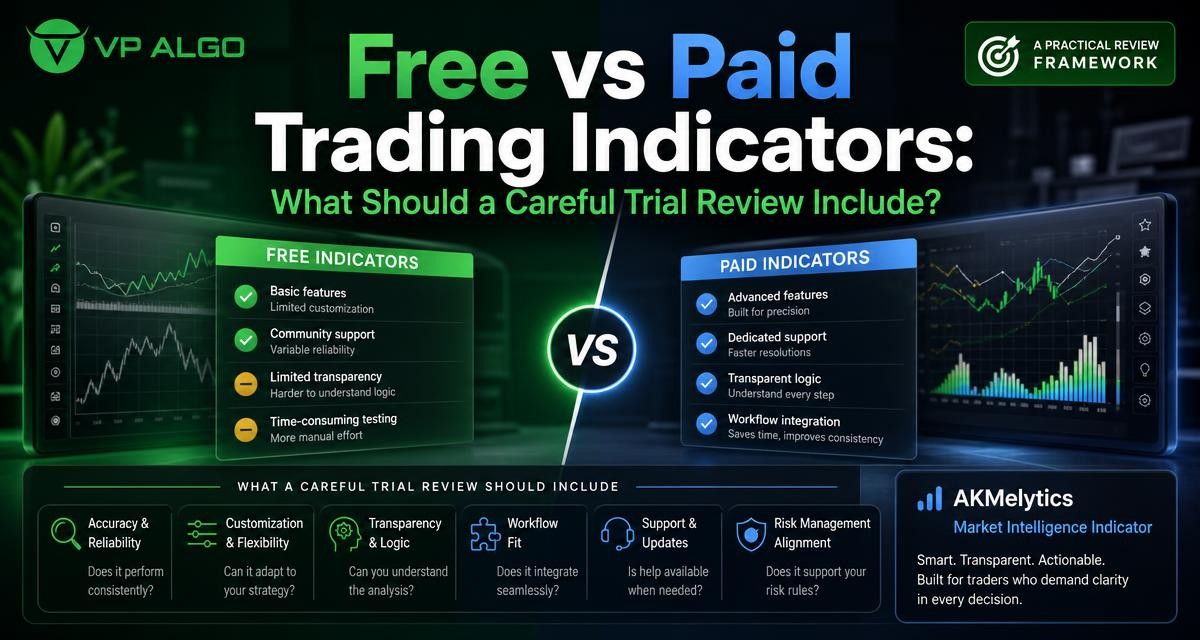
Searching for the best trading indicators free can be a sensible starting point, but a free label does not tell you whether an indicator fits your process. A careful review should examine what the tool measures, how clearly it presents information, whether it supports your TradingView workflow and whether you can understand the reasoning behind its signals. The same standards apply when comparing a free indicator with a paid tool such as AKMelytics – Market Intelligence Indicator.
Why free versus paid is not the whole decision
Free indicators can be useful for learning technical analysis, testing a chart layout or exploring concepts such as trend, momentum and market structure. They may also help a trader discover which types of information are relevant before committing to a more developed tool. However, free access does not automatically mean that the indicator is simple, transparent or suitable for every trading routine.
Paid indicators may offer a more organised combination of analytical features, clearer chart presentation or access to installation and usage assistance. Those additions only matter if they solve a real problem in your workflow. A higher price should not be treated as evidence of better trading outcomes, and no indicator removes the need for independent analysis, risk control or decision-making.
Start with the question the indicator is meant to answer
A useful trial begins with a defined question. Instead of asking whether an indicator looks impressive, ask what information you need before making a decision. For example, you may want help identifying the current trend, assessing momentum, reading market structure or considering signs associated with institutional activity and smart money concepts.
This distinction prevents a common mistake: comparing tools by the number of colours, labels or chart signals they display. A crowded chart can contain more information while making the decision process less clear. The best choice is the indicator that helps you answer relevant questions without encouraging you to follow unexplained prompts.
Useful questions before opening a trial
- Which part of my analysis takes the most time?
- Do I need trend assessment, momentum context, market structure information or a combination?
- Can I explain what each major label or signal is intended to show?
- Will the tool fit the timeframes and chart routine I already use?
- Am I reviewing the indicator for education and decision support rather than expecting guaranteed results?
What to compare during a free indicator review
A free TradingView indicator should be reviewed on practical usefulness rather than novelty. Start by observing how the tool behaves on charts you already understand. Look at both clear and uncertain market conditions. The objective is not to find a perfect signal, but to learn whether the information remains understandable when the market is moving sideways, changing direction or producing conflicting evidence.
| Review area | What to examine | Useful review question |
|---|---|---|
| Purpose | The main analytical problem the indicator addresses | Does it add information I actually need? |
| Clarity | Labels, colours, alerts and chart layout | Can I interpret the display without guessing? |
| Workflow fit | How it fits with your existing chart routine | Does it simplify or interrupt my analysis? |
| Context | Trend, momentum, structure and related conditions | Does it provide context rather than an isolated prompt? |
| Transparency | Whether the analysis process can be understood | Can I explain why the tool is showing this information? |
| Support | Installation, activation and usage assistance | What help is available if setup is unclear? |
Clarity of signals and chart presentation
During a trial, note whether the chart helps you distinguish an observation from an instruction. A trend label, momentum reading or market structure marking may be useful as part of a wider assessment. It becomes less useful when every change is presented as an urgent buy or sell event without enough context.
Also check whether the visual design remains readable at the chart scales and timeframes you normally use. A tool that looks clear on one chart may become difficult to follow when several elements overlap. Record which settings you changed and whether those changes improved understanding or simply reduced visible information.
Understanding the analysis process
A careful review should ask how the indicator contributes to analysis. If a tool refers to smart money concepts or institutional activity, you should still seek to understand what the relevant markings represent and how they relate to price behaviour. The phrase smart money indicator describes an area of analysis; it does not by itself establish that a signal is accurate or that a trade will succeed.
The same principle applies to a market structure indicator or a momentum indicator for TradingView. A structure marking may help organise your reading of price action, while a momentum feature may add context about movement. Neither should be treated as a substitute for understanding the market, the instrument being reviewed or the risks of a potential decision.
What to assess in a paid indicator trial
A paid trial deserves a more disciplined review because you are assessing both the analytical tool and the experience around it. For an indicator designed to combine trend analysis, momentum evaluation, market structure, institutional activity, multi-timeframe trend assessment and smart money analysis, consider whether those elements form a coherent workflow.
Do not judge the tool only by whether it produces more markings than a free alternative. Judge whether the combined information helps you move through your normal process in a logical order. For example, you might first consider broader trend conditions, then review momentum and market structure, and finally examine whether the chart provides additional context related to institutional activity or smart money concepts.
Feature depth versus feature overload
Feature depth is useful when each component has a clear role. A tool that brings several forms of analysis into one TradingView workspace may reduce the need to switch between unrelated charts or scripts. It may also help a trader compare different forms of context in one place.
More features can also create confusion. During a trial, hide individual elements where possible and observe how your interpretation changes. This can show which functions are central to your process and which ones merely add visual noise. Keep notes in plain language rather than relying on impressions such as “the chart looks better.”
Support and setup experience
Technical setup is part of the product experience. Review how access is provided, whether installation instructions are understandable and whether you know where to ask for help. VP ALGO TRADING states that customers can contact support for installation, activation or usage assistance, and that product access involves providing a TradingView ID by email after purchase.
That information is relevant to a trial review because an indicator should be assessed not only after it appears on the chart, but also during the steps required to use it. The supplied business information also states that the website offers a request-based 7-day free trial for its indicator and Telegram channel. Trial conditions should be confirmed directly with the company, since eligibility and other terms may change.
A practical trial process for free and paid tools
Use the same process for every indicator you compare. Keeping the method consistent makes it easier to separate the tool’s actual contribution from excitement caused by a new chart design or an unfamiliar signal.
- Define your review goal. Write down whether you are testing trend analysis, momentum, market structure, smart money concepts or a combination of these areas.
- Use familiar charts. Review the indicator in the chart environment and routine you already understand rather than changing everything at once.
- Observe different conditions. Include directional movement, consolidation and periods where the chart provides mixed information.
- Explain each important display element. If you cannot describe what a label or marking is intended to communicate, treat that as a usability issue.
- Compare the decision process. Ask whether the indicator makes your analysis more organised, or whether it encourages impulsive reactions.
- Record limitations. Note visual clutter, unclear terminology, missing context, setup difficulties and any functions you do not use.
- Review support. Consider how straightforward it is to obtain installation, activation or usage assistance when needed.
How to compare free and paid options fairly
Free tools and paid tools should be judged against the same practical criteria, but not necessarily the same expectations. A free indicator may be entirely appropriate if it gives you the specific information you need and you can interpret it responsibly. A paid tool may be worth considering when its organisation, combined analysis or support addresses a clear gap in your current process.
| Criterion | Free indicator | Paid indicator |
|---|---|---|
| Initial commitment | Usually easier to test without a purchase decision | Requires closer review of fit and access terms |
| Learning value | Can help explore individual concepts | May organise several concepts into one workflow |
| Feature scope | May focus on one function or a smaller set of tools | May combine trend, momentum, structure and other context |
| Support expectations | May be limited or self-directed | May include product-specific installation or usage assistance |
| Decision standard | Useful if it is clear and relevant | Useful only if added depth improves your process |
This comparison does not establish that paid tools are more accurate or that free tools are inadequate. It simply creates a clearer basis for deciding what you need. Avoid using past chart appearances as proof of future performance, and do not convert a visual signal into a guaranteed outcome.
Common mistakes when reviewing trading indicators
Choosing the most active-looking chart
A chart filled with signals may feel informative, but activity is not the same as usefulness. Look for information that can be explained and applied consistently within your own analysis.
Confusing a label with a complete strategy
A trend indicator for TradingView, a momentum feature or a smart money display can support a process. It does not automatically define position sizing, risk limits, entry rules or exit decisions. Those elements require separate consideration.
Testing too many variables at once
Changing the indicator, timeframe, chart layout and trading approach simultaneously makes the result difficult to interpret. Change one major variable at a time and keep a short record of what you observed.
Ignoring usability because the tool is free
Free access has value, but time spent interpreting unclear charts also has a cost. If a free indicator repeatedly distracts you or creates uncertainty, it may not be the best fit even without a purchase price.
When a structured indicator may be worth further consideration
A structured tool may deserve further review when you want several forms of market context in one TradingView workspace. The Delphi Intelligence Smart Money Indicator offered by VP ALGO TRADING is described as including trend analysis, momentum signals, market structure, institutional flow monitoring, multi-timeframe trend assessment and smart money analysis.
For a product such as AKMelytics – Market Intelligence Indicator, the key question is not whether the name sounds advanced. It is whether the features are understandable, relevant to your routine and helpful for evaluating market conditions. Use the trial to examine the process, ask for clarification when needed and make your own decision without treating the indicator as financial advice.
FAQ
Are free trading indicators good enough for beginners?
They can be useful for learning and testing concepts such as trend, momentum and market structure. Their value depends on clarity, relevance and your ability to understand the information rather than simply follow a signal.
What should I look for in the best trading indicators free options?
Look for a clear purpose, readable chart presentation, understandable analysis, compatibility with your workflow and information that supports rather than replaces your own decision-making.
Is a paid smart money indicator automatically better?
No. A paid indicator should be evaluated by whether its features, organisation and support solve a real problem for you. Price alone does not prove accuracy or future trading results.
How should I test a TradingView indicator?
Use familiar charts, review different market conditions, explain the main display elements, record limitations and compare the tool with your existing analysis process.
What does a market structure indicator help with?
It may help organise observations about price structure and changing market conditions. You should still understand how the markings are produced and consider them alongside other analysis.
Can an indicator provide financial advice?
An indicator is a trading analysis tool, not a financial adviser. VP ALGO TRADING positions its indicators for educational and trading-decision assistance purposes rather than official financial advice.
What should I ask before starting a product trial?
Ask how access works, what the trial includes, how installation and activation are handled, where usage support is available and which features you should evaluate. Confirm current terms directly with the provider.


Recent Comments