
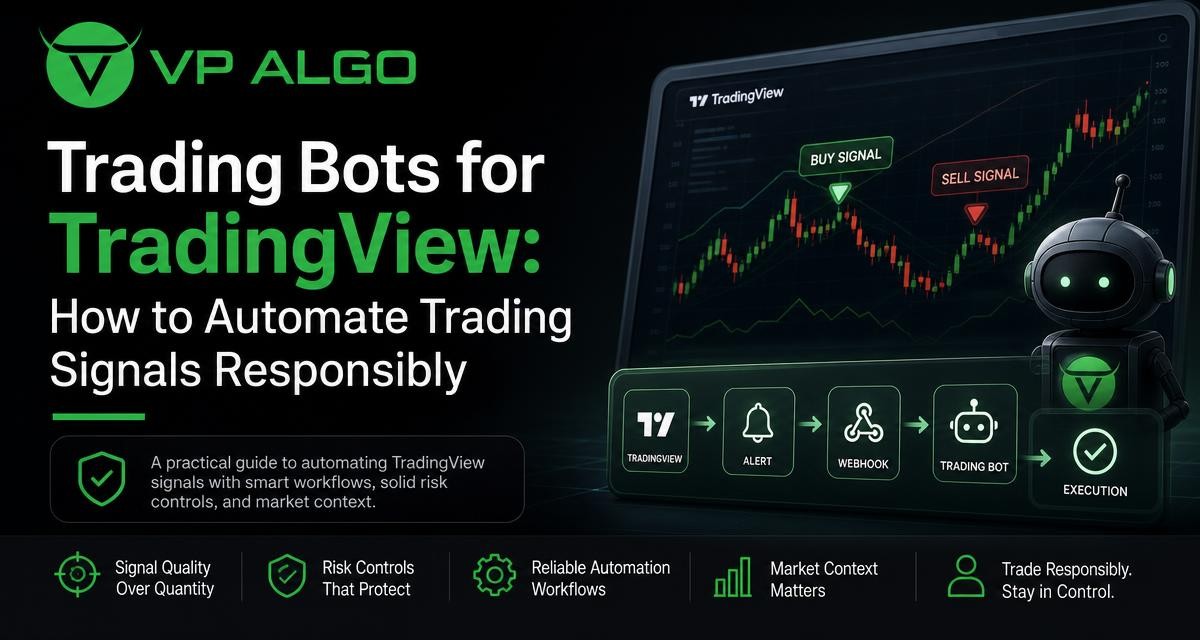
A trading bot can help automate parts of a TradingView-based workflow, but automation does not turn an uncertain market signal into a guaranteed trading result. The most responsible approach is to understand the difference between a TradingView trading indicator and a bot, define how alerts are generated and delivered, test each step carefully, and keep risk controls under human oversight.
What is a trading bot?
A trading bot is software designed to perform predefined actions in response to market data or trading conditions. Depending on its design, it may monitor prices, interpret signals, send notifications, prepare orders, or communicate with another trading system for execution.
The term “bot” covers a wide range of tools. Some systems only alert a trader when a condition occurs. Others automate order placement, position management, or repeated strategy rules. These systems should not be treated as interchangeable. A notification tool and an execution bot involve very different levels of operational and financial risk.
Indicator, alert, and bot: the basic distinction
| Tool | Primary role | Questions to ask |
|---|---|---|
| TradingView trading indicator | Analyzes chart data and displays conditions, patterns, or signals. | What does it measure? Which timeframe and market data does it use? |
| TradingView alert | Notifies the user when a selected condition is met. | When is the alert triggered, and can the condition change before confirmation? |
| Trading bot | Applies programmed rules to monitoring, decisions, notifications, or execution. | What actions can it take, and what safeguards stop unwanted activity? |
| Execution connection | Transfers an instruction to a separate trading account or platform. | How are authentication, order errors, duplicates, and disconnections handled? |
An indicator can support analysis without placing trades. A bot can use an indicator’s output as one input, but it still needs clear rules for confirmation, position sizing, exits, and failure handling. Treating an indicator as if it were a complete automated strategy is a common source of confusion.
How TradingView signal automation generally works
A typical automation workflow has several stages. First, a TradingView chart displays data and an indicator evaluates selected conditions. Next, an alert is created around a defined event. The alert may notify the trader directly or pass a message to another system. That system then interprets the message and may record it, request confirmation, or send an instruction to an execution venue.
Each stage can introduce a different type of error. The indicator may produce a condition that is misunderstood. The alert may be configured for the wrong symbol or timeframe. A message may be delayed, duplicated, or incomplete. An execution system may reject an order, lose its connection, or respond differently than expected. Responsible automation therefore focuses on the entire chain rather than only the chart signal.
A practical signal workflow
- Define the condition. Write down exactly what must happen before an alert is considered valid, including the market, timeframe, confirmation rule, and invalidation condition.
- Review the chart context. Consider trend, momentum, market structure, and other relevant conditions rather than relying on one isolated signal.
- Generate the alert. Configure the alert so that its timing and trigger behavior are understood.
- Validate the message. Check that the symbol, direction, timeframe, timestamp, and any required values are transmitted correctly.
- Apply risk rules. Determine whether the event should create an alert, a paper-trading action, a manual order review, or an automated instruction.
- Monitor the result. Keep records of alerts, decisions, rejected actions, and system interruptions.
This structure separates market analysis from execution. It also makes it easier to identify where a problem occurred if the final action does not match the original signal.
Why a TradingView indicator is not automatically a trading bot
A TradingView indicator is primarily an analytical tool. It can help organize chart information by highlighting trend direction, momentum changes, market structure, institutional activity, or smart money conditions. It may support a trader’s decision process, but the displayed condition does not by itself define every element needed for automation.
For example, a signal may identify a possible change in momentum while leaving several questions unanswered. Should an action occur immediately or only after a candle closes? What happens if the broader trend disagrees? Where is the setup invalidated? How should an open position be handled if a new opposing signal appears? A bot requires explicit answers to these questions.
What to document before automating
- The exact market and instrument being monitored.
- The chart timeframe and whether signals require candle-close confirmation.
- The conditions that create a signal and the conditions that cancel it.
- The difference between an entry signal, an exit signal, and a warning signal.
- The maximum number of actions allowed within a defined period.
- How the system handles missing data, duplicate alerts, and rejected instructions.
- Who or what is responsible for reviewing unusual events.
Writing these rules in plain language is useful even when the intended workflow remains manual. If the logic cannot be explained clearly, it is difficult to test or automate responsibly.
Using market context with automated signals
Automation is often most useful when it reduces repetitive monitoring while preserving a structured review process. A signal can be evaluated alongside broader market context, including trend analysis, momentum, market structure, institutional flow observations, and multi-timeframe conditions.
Tools such as the Delphi Intelligence Smart Money Indicator from VP ALGO TRADING are designed to help TradingView users assess several of these market-context areas. The indicator includes features related to trend analysis, momentum signals, market structure, institutional flow monitoring, multi-timeframe trend assessment, and smart money analysis. These features can help organize information, but they do not remove the need for interpretation, testing, or risk management.
Context questions for a signal review
- Does the signal agree with the broader trend, or is it counter to the dominant movement?
- Is momentum supporting the setup, weakening, or producing conflicting information?
- What market-structure event is relevant to the signal?
- Do higher-timeframe conditions support the lower-timeframe observation?
- Is the signal occurring in a situation where liquidity, volatility, or sudden news could affect execution?
These questions are not a promise of better results. They are a way to avoid treating one alert as a complete explanation of market conditions.
Risk controls every automation plan should consider
A responsible trading bot should have controls that limit what it can do when conditions are unclear or the system behaves unexpectedly. Risk controls should be designed before automation is activated, not added only after a problem occurs.
| Control area | Examples of what to define |
|---|---|
| Signal validation | Required confirmation, acceptable data age, symbol verification, and duplicate-alert handling. |
| Position exposure | Maximum permitted exposure, number of concurrent actions, and rules for existing positions. |
| Order handling | Behavior after rejection, partial completion, delay, timeout, or unexpected response. |
| System failures | What happens after a connection loss, unavailable service, missing alert, or software error. |
| Human oversight | When manual review is required and who can pause the workflow. |
| Record keeping | Logs for alerts, messages, actions, errors, and later review. |
Controls should be understandable and testable. A rule such as “stop after abnormal activity” needs a defined meaning. For example, the system could require manual review after a repeated error, an unexpected order response, or a message that does not contain all required fields. The exact thresholds depend on the user’s design and should not be assumed from an indicator alone.
Use a staged rollout
Moving directly from a chart signal to live execution leaves little room to discover configuration mistakes. A staged rollout is easier to inspect:
- Start with chart-based observation and written signal records.
- Use alerts without automated execution to confirm timing and message content.
- Test the workflow in a non-live environment where possible.
- Review duplicate signals, missed messages, and unexpected conditions.
- Only then consider whether a limited form of automation is appropriate.
Testing should include ordinary scenarios and failure scenarios. A system that works when everything is normal may still behave poorly when an alert arrives twice, data is delayed, or an execution request is rejected.
Common mistakes when automating TradingView signals
Automating an undefined strategy
A vague instruction such as “buy when the indicator turns bullish” is not enough for a bot. The terms bullish, turns, and buy need precise definitions. Without them, the same chart condition may be interpreted differently across timeframes or software components.
Ignoring confirmation timing
Some chart conditions can change before a candle or calculation period is complete. Users should understand whether an alert is based on an evolving value or a confirmed condition. This distinction affects how signals are interpreted and recorded.
Assuming more signals means better automation
Increasing alert frequency can create noise, duplicate decisions, and greater operational complexity. A useful workflow is not measured only by how many notifications it generates. It should also be judged by clarity, consistency, reviewability, and its ability to stop when conditions are not understood.
Neglecting access and security
Any connection between chart alerts and another system should be treated carefully. Users should understand what permissions are being granted, protect credentials, restrict access where possible, and review whether an unexpected message could trigger an unintended action.
How to evaluate a trading bot or automation workflow
Before choosing or building a trading bot, evaluate the workflow rather than relying on promotional labels such as “smart,” “automatic,” or “advanced.” Ask what the tool actually does, which parts remain manual, and how errors are handled.
- Clarity: Are the signal rules and supported actions explained in terms a user can verify?
- Control: Can the user pause, review, or limit actions?
- Transparency: Are the inputs, timeframes, and alert conditions understandable?
- Testing: Can the workflow be checked before any live action is considered?
- Monitoring: Are alerts and system events recorded for later review?
- Support information: Are installation, activation, and usage steps clearly provided?
VP ALGO TRADING develops TradingView indicators and algorithmic trading tools for educational and trading-decision assistance purposes. Its Delphi Intelligence Smart Money Indicator is intended to help users evaluate market conditions; it should not be treated as financial advice or as a guarantee of a particular result. Users who need product installation, activation, or usage assistance can contact the company through its stated support process.
A responsible automation checklist
Use this checklist before enabling any trading bot or signal automation workflow:
- Have the signal conditions been written in precise, testable language?
- Is it clear whether the alert uses an unconfirmed or confirmed condition?
- Are market, symbol, timeframe, and direction checked before action?
- Can duplicate, delayed, incomplete, or rejected messages be identified?
- Are exposure and position rules defined independently of the indicator?
- Is there a clear pause or shutdown process?
- Have normal and failure scenarios been tested?
- Are results and errors recorded without assuming that historical behavior will repeat?
The goal of automation is not to eliminate uncertainty. It is to make a defined process more consistent and easier to review. Good design keeps the limits of the system visible and leaves room for human judgment when a situation falls outside the rules.
Frequently asked questions
What is the difference between a TradingView indicator and a trading bot?
A TradingView indicator analyzes chart information and displays conditions or signals. A trading bot applies programmed rules to monitoring, notifications, or actions. An indicator can be used as an input for a bot, but it is not automatically a complete execution system.
Can TradingView signals be automated?
TradingView signals can be incorporated into an automation workflow using alert and message-handling processes. The exact setup depends on the tools involved, and users should verify how alerts, authentication, errors, and execution are handled before relying on automation.
Does a trading bot guarantee profitable results?
No. A bot follows programmed rules, while market conditions can change and system errors can occur. Automation may improve consistency in applying a process, but it cannot guarantee profits or eliminate trading losses.
Should every indicator signal trigger an automated action?
No. A signal may need confirmation from timeframe, trend, momentum, or market-structure context. It may also be more appropriate as an alert for manual review rather than an automatic instruction.
What should be tested before using signal automation?
Test signal timing, message contents, duplicate alerts, missing data, connection interruptions, rejected instructions, and shutdown procedures. Begin with observation or non-live testing where possible and review the records before considering further automation.
Can a smart money indicator replace risk management?
No. A smart money indicator can help organize market-context information, but it does not define appropriate exposure, execution limits, or loss controls for every user. Risk management must be designed separately and reviewed regularly.


Recent Comments