
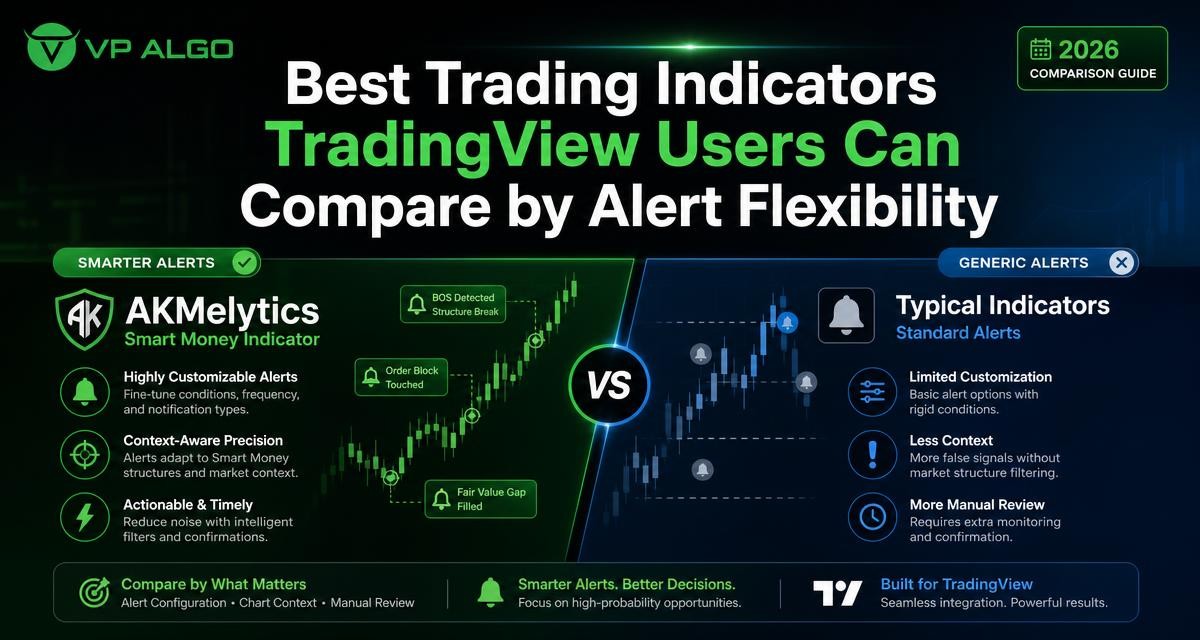
Finding the best trading indicators TradingView users can rely on is not only a matter of counting features. A more practical comparison looks at how an indicator creates alerts, how much chart context it provides, and how much manual review remains before a trader can evaluate a potential setup. This framework helps compare simple signal tools with broader indicators such as AKMelytics – Smart Money Indicator without treating any tool as a guarantee of trading results.
Why alert flexibility matters when comparing TradingView indicators
An alert is useful only when it fits the way you analyse a chart. A simple crossover alert may be easy to understand, but it can leave the trader to investigate trend direction, momentum, market structure and other conditions separately. A more contextual alert may reduce some of that searching, although it still requires review and judgement.
For that reason, alert flexibility should be assessed alongside the indicator’s analytical scope. The question is not simply whether an indicator can create an alert. The better questions are: What event triggers it? Can the alert reflect the indicator’s main conditions? Does it point to a clear area of the chart? How much interpretation is still needed?
A practical comparison framework
When reviewing the best trading indicators TradingView offers, use four comparison areas. These areas are useful for beginners who need clarity and for experienced traders who want a more efficient review process.
| Comparison area | What to examine | Why it matters |
|---|---|---|
| Alert trigger | Which event or condition creates the notification? | It shows whether the alert is tied to a meaningful chart event or only a basic signal. |
| Context | Does the tool display trend, momentum, structure or flow information? | More context can make the alert easier to investigate, while still requiring independent review. |
| Configuration | Can the user adjust the relevant alert conditions and chart settings? | Flexible settings may help users align alerts with their own analysis process. |
| Manual review | How much chart study is needed after an alert appears? | This indicates whether the indicator is mainly a notification tool or a broader analysis aid. |
Compare indicators by the type of alert they create
Basic price or crossover alerts
Some indicators focus on a direct event, such as a price relationship or a crossing signal. These tools can be straightforward to follow because the trigger is relatively narrow. They may be suitable for traders who already have a separate process for checking the wider market context.
The limitation is that a basic alert often answers only one question: did the selected event occur? It may not explain whether the broader trend agrees, whether momentum supports the move, or whether market structure has changed. Those checks remain the trader’s responsibility.
Momentum-based alerts
A momentum indicator for TradingView can draw attention to changes in directional pressure or the strength of a move, depending on its design. Momentum alerts can be useful as screening events, but they should not automatically be treated as complete trade analysis. A momentum change can appear within a wider trend, near a structural level, or during a period that requires additional chart review.
When comparing these tools, check whether the alert is presented alongside a readable chart signal and whether the indicator provides any additional context. The presence of an alert does not remove the need to consider the market conditions around it.
Trend and market structure alerts
A trend indicator for TradingView generally focuses on directional conditions, while a market structure indicator may highlight events such as breaks in structure or changes in the way price is forming swings. These alerts can be more informative than a single isolated signal because they relate to the organisation of price movement.
However, structure-based alerts can still require interpretation. Traders may need to inspect the relevant timeframe, nearby price areas and the relationship between the alert and the prevailing trend. A structure event is a point for analysis, not a promise of what price will do next.
Multi-condition or contextual alerts
The most flexible alert systems are designed around more than one analytical condition. For example, an indicator may combine elements related to momentum, trend, market structure or smart money concepts. This can create a more structured starting point for review than an alert based on one event alone.
Contextual alerts should still be evaluated carefully. More conditions do not automatically make an alert better, and a complicated signal may be harder to understand. The useful comparison is whether the alert’s logic is clear enough for the trader to review the chart consistently.
Chart context is as important as the notification
TradingView indicator alerts are most useful when the chart shows why the notification occurred. A message without context can send the trader back through several separate indicators and timeframes before the setup can be assessed. A chart that groups relevant information together may make the review more orderly.
Look for context in the following areas:
- Trend direction: Can the user see the broader directional assessment rather than only a short-term signal?
- Momentum: Does the tool provide information about momentum conditions that may support further investigation?
- Market structure: Are events such as breaks of structure or changes of character identified clearly?
- Market flow: Does the indicator include information intended to help users examine flow or institutional activity?
- Timeframe context: Can the trader compare the alert with conditions on more than one timeframe?
- Reference levels: Are relevant chart levels or projections visible for further analysis?
These features do not replace a trading plan. They can, however, help a trader understand what to inspect after an alert appears instead of reacting to a notification in isolation.
How much manual review does each indicator require?
Manual review is not necessarily a weakness. Many traders want an indicator to organise information while keeping the final evaluation in their own hands. The right amount of review depends on the user’s experience, process and tolerance for complexity.
| Indicator approach | Typical review requirement | Useful comparison question |
|---|---|---|
| Single-event signal | High: the trader usually checks most surrounding conditions separately. | Does the simplicity make the signal easy to test and understand? |
| Trend or momentum tool | Moderate to high: direction or momentum still needs to be placed in context. | Can the trader identify when the signal conflicts with the wider chart? |
| Market structure tool | Moderate: the event may be clearer, but timeframe and price context remain important. | Are structure events displayed in a way the user can interpret consistently? |
| Multi-factor indicator | Moderate: more information may be available in one place, but the user must understand the conditions. | Does the broader context improve review without creating confusion? |
A useful tool should make the review process more structured, not encourage automatic decisions. Before relying on any alert workflow, traders can observe how often alerts appear, what chart conditions accompany them and which additional checks are consistently necessary.
Where AKMelytics fits into the comparison
AKMelytics – Smart Money Indicator is a TradingView technical analysis tool from VP ALGO TRADING. Its stated scope combines trading algorithms for momentum, trend analysis, market structure, market flow, relative strength and smart money concepts. It also includes multi-timeframe analysis, BOS and CHoCH structure events, Fibonacci projections, volatility-based target and risk reference levels, dashboard context and configurable TradingView alerts.
That combination makes it relevant to a comparison based on alert flexibility and chart context. Instead of focusing on one narrow event, a trader can examine how the indicator brings several analytical areas together. The appropriate evaluation is still practical: understand what each displayed condition means, review the chart around the alert, and decide whether the information fits the user’s own process.
Questions to ask when reviewing AKMelytics
- Which indicator conditions can be used to create or configure an alert?
- Are the alert events easy to connect with the trend, momentum and structure information on the chart?
- Does the multi-timeframe view help the trader organise review, or does it add information that needs further explanation?
- Can the trader distinguish a structure event from a broader contextual assessment?
- Are the reference levels being used for analysis rather than treated as guaranteed outcomes?
- Does the dashboard present enough information to support a repeatable review routine?
VP ALGO TRADING positions its indicators as tools for educational and trading-decision assistance, not as financial advice. The product should therefore be assessed as part of a broader research and risk-management process rather than as an automatic decision-maker.
Alert flexibility versus alert overload
More configuration is not always better. If a trader creates too many notifications, the alert system can become difficult to monitor. Frequent messages may also encourage rushed decisions, particularly when the user has not defined what each alert means or what follow-up checks are required.
A sensible configuration begins with a small number of meaningful conditions. For each alert, write down the purpose, the chart context to inspect and the reasons the alert may be disregarded. This turns a notification into part of a review checklist instead of treating it as a command to enter or exit a position.
A simple alert review checklist
- Identify the event that triggered the notification.
- Check the relevant timeframe and the surrounding price structure.
- Review trend and momentum conditions rather than relying on the alert alone.
- Look for agreement or conflict between the displayed analytical factors.
- Apply the trader’s own risk rules and decision process.
- Record the observation so the alert workflow can be reviewed over time.
How beginners and experienced traders may compare differently
Beginners may benefit from a clear interface and a limited set of understandable alerts. A tool with many features can be useful, but only if the trader learns what each feature represents. Starting with one or two alert conditions and a written review routine may be more practical than activating every available option.
More experienced traders may focus on configuration, multi-timeframe context and how the indicator fits existing analysis. They may also compare whether the tool reduces duplicated chart work without hiding the reasoning behind a signal. In both cases, clarity matters more than the number of features listed on a product page.
What to check before choosing a TradingView indicator
Before deciding which indicator belongs in a TradingView workspace, review the product documentation and test the workflow in an appropriate learning environment. The goal is to understand how the indicator behaves and what decisions remain with the trader.
- Confirm which analytical areas the indicator actually covers.
- Check whether configurable alerts are included and how their conditions are described.
- Assess whether the chart labels and dashboard information are understandable.
- Compare the amount of manual review required after an alert.
- Consider whether the indicator complements, rather than duplicates, the rest of the chart.
- Avoid interpreting alerts as guarantees of profits or future price movement.
VP ALGO TRADING states that customers can contact support for installation, activation or usage assistance after purchase. The company also offers a request-based seven-day free trial for its indicator and Telegram channel. Eligibility and other terms should be confirmed directly with the company before relying on those options.
Final perspective
The best trading indicators TradingView users can compare are not necessarily the ones with the longest feature list. A stronger comparison asks whether the alert is configurable, whether the chart provides meaningful context and whether the remaining manual review is clear and manageable.
Simple indicators may suit traders who prefer to conduct their own detailed analysis after every notification. Broader tools such as AKMelytics – Smart Money Indicator may appeal to users who want trend, momentum, structure, flow and smart money information organised within one analytical framework. In either case, alerts are prompts for investigation, not financial advice or guaranteed trade outcomes.
Frequently asked questions
What should I compare when looking for the best trading indicators TradingView users can use?
Compare the alert trigger, configuration options, chart context and amount of manual review required. Also consider whether the indicator’s analytical approach fits your own process.
What are TradingView indicator alerts?
They are notifications associated with conditions or events identified by an indicator. The exact conditions depend on the tool, so users should understand what each alert represents before acting on it.
Are configurable alerts better than simple alerts?
Not automatically. Configurable alerts can provide more flexibility, but they may also add complexity. The better option is the one whose conditions the trader understands and can review consistently.
Why does chart context matter after an alert?
Context helps the trader examine trend, momentum, market structure and other surrounding conditions. Without that review, an alert may provide only a narrow view of the market.
What does AKMelytics – Smart Money Indicator include?
According to the supplied product information, it includes momentum, trend analysis, market structure, market flow, relative strength and smart money concepts, along with multi-timeframe analysis, BOS and CHoCH events, Fibonacci projections, reference levels, dashboard context and configurable TradingView alerts.
Can a TradingView indicator guarantee profitable results?
No. An indicator can support analysis and decision-making, but it cannot guarantee profits, eliminate losses or predict future market results.


Recent Comments