
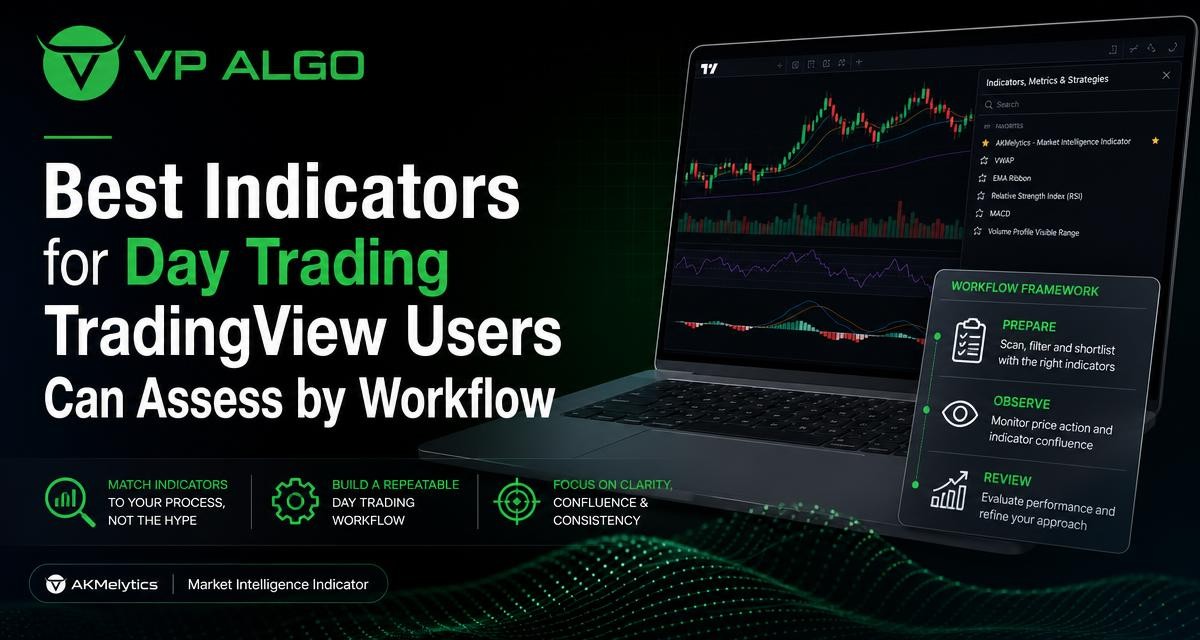
The best indicators for day trading TradingView users can assess are not necessarily the ones with the longest feature list or the most buy-and-sell labels. A more useful approach is to match each indicator type to a specific part of your workflow: preparing a chart, observing developing conditions, or reviewing decisions after the session. This helps traders compare tools by purpose rather than looking for one indicator that can make every trading decision.
Why the best indicator depends on your workflow
Day trading requires decisions to be made within a changing market environment. Before a session, you may want to understand the broader trend and important areas of structure. During observation, you may be watching momentum, possible shifts in direction, or signs that market activity is becoming more or less supportive of a setup. Afterward, you may want to review whether your interpretation was consistent with the information visible on the chart.
These are different tasks. A trend indicator can help organize directional context, while a momentum indicator may help describe the pace of a move. A market structure tool can support the review of swings and breaks, and a smart money or institutional-flow feature may add another layer for assessing participation. None of these roles automatically creates a complete trading method.
| Workflow stage | Useful indicator role | Questions to ask |
|---|---|---|
| Preparation | Trend and multi-timeframe context | What is the broader directional condition? |
| Observation | Momentum and market structure | Is price moving with strength, slowing, or changing structure? |
| Context review | Institutional activity and smart money concepts | What additional participation or positioning clues are available? |
| Post-session review | Consistent chart information | Did the tool improve the quality of the review, or add confusion? |
Trend indicators for preparation
Trend indicators are often most useful before active decision-making begins. Their purpose is to help organize the chart around directional conditions rather than to provide a complete entry or exit decision. This can be valuable when a trader wants to avoid treating every short-term price movement as a new trend.
When assessing a trend indicator for TradingView, consider whether it gives you a clear way to view direction across the timeframes you already use. A tool that supports multi-timeframe trend assessment may help you compare broader context with the chart where you are observing a potential setup. The goal is not to force lower-timeframe activity to agree with a higher-timeframe view, but to make the relationship visible for review.
Questions for evaluating a trend tool
- Does it make the current directional condition easier to describe?
- Can you use it consistently during preparation and later review?
- Does it add context without encouraging repeated changes to your chart?
- Can you explain what its trend information means before looking for an entry?
A trend indicator should be treated as context. It does not remove the need to define the market, timeframe, setup and risk process that govern a trading decision.
Momentum indicators for observing market pace
Momentum indicators focus on the strength or speed of movement. For some traders, this makes them useful during observation because they provide a way to describe whether a move appears to be building, continuing, weakening or becoming less decisive. A momentum indicator for TradingView can therefore complement, rather than replace, price and structure analysis.
The most important comparison is not which momentum tool produces the most signals. It is whether the tool helps you answer a repeatable question. For example, you might use it to assess whether momentum agrees with a developing move, whether momentum is losing strength near a structural area, or whether a potential setup is being supported by enough movement to deserve further review.
How to assess momentum information
- Define the momentum question before adding the indicator to a chart.
- Observe how the reading behaves during both directional and less directional conditions.
- Compare the reading with price structure instead of treating it as an isolated signal.
- Review whether it improved your explanation of the trade idea afterward.
Momentum can change quickly. A reading that appears supportive at one moment may not describe the market a few minutes later. This is one reason a momentum tool is better viewed as part of an observation process than as a standalone buy-and-sell system.
Market structure indicators for chart context
Market structure provides a framework for studying swings, breaks and changes in the way price is moving. A market structure indicator can help traders organize information that may otherwise be difficult to track manually, particularly when several swings develop close together.
When comparing structure tools, look at how clearly they present the information and whether the display supports your review habits. A useful tool should help you explain what changed on the chart, not simply draw more lines. Consider whether its markings remain understandable across the timeframes you use and whether you can distinguish meaningful structural information from minor fluctuations.
Structure questions to include in a review
- What was the most recent meaningful swing?
- Did price maintain or challenge the prior structure?
- Was the apparent break supported by the surrounding context?
- Did the indicator help you identify a change, or did it merely confirm what you had already decided?
Structure analysis is interpretive. An indicator can organize observations, but it cannot determine the significance of every price movement for every trading plan.
Institutional activity and smart money concepts
Some TradingView users want more than trend and momentum readings. They also want to examine market structure, institutional activity and smart money concepts as part of their chart review. These categories are often used to discuss how larger areas of participation or changes in market behavior may relate to price action.
VP ALGO TRADING develops and sells TradingView indicators and algorithmic trading tools, including the AKMelytics – Market Intelligence Indicator identified for this topic. The business describes its indicator offering as including features related to trend analysis, momentum signals, market structure, institutional flow monitoring, multi-timeframe trend assessment and smart money analysis. For a trader comparing tools, the relevant question is how these features fit into an existing preparation and observation routine.
A smart money indicator should not be assessed only by the number of labels it displays. Consider whether its information helps you frame a market condition, investigate a possible setup and conduct a consistent review. If the added concepts are not connected to a defined process, more chart information may create more interpretation rather than better analysis.
What to look for in a smart money tool
- A clear relationship between smart money concepts and the price structure being reviewed.
- Information that can be compared across the timeframes relevant to your process.
- Displays that support observation without requiring constant changes to settings.
- A practical way to record what the tool showed before and after a decision.
These features can support education and trading-decision assistance, but they are not financial advice. They also do not guarantee profitable results or eliminate the possibility of losses.
Is there a best trading indicator buy and sell tool?
The phrase best trading indicator buy and sell often suggests that one tool can identify the correct action in every market condition. In practice, a buy or sell label is only one piece of information. Its meaning depends on the timeframe, market context, trading plan and rules used to interpret it.
A better assessment begins by asking what the signal represents. Is it a trend change, a momentum event, a structural break or an alert based on several conditions? Can you identify the surrounding context on the chart? Can you review the same type of signal consistently rather than selecting only the examples that worked?
| Signal-focused question | More useful evaluation question |
|---|---|
| How many buy and sell labels does it produce? | Does it answer a defined question in my workflow? |
| Can it find every move? | Does it help me describe the conditions I am prepared to review? |
| Is this the best signal? | Can I apply its information consistently across charts and sessions? |
| Did this label lead to a favorable move? | What did the full chart context show when the label appeared? |
This approach avoids turning a chart label into a promise. It also makes it easier to compare free indicators, built-in tools and specialized products on the basis of usefulness rather than marketing language.
How to compare free and specialized TradingView indicators
Free trading indicators can be appropriate for learning and for testing whether a particular type of information belongs in your workflow. They may also help you understand basic concepts such as trend, momentum or structure before you decide whether a more integrated tool is suitable for your chart review.
A specialized indicator may bring several analytical categories into one display. That can be helpful when the alternative is switching among several separate tools, but integration is only valuable when the information remains readable. When comparing options, assess clarity, consistency and how much time the tool saves during preparation and review.
A practical comparison checklist
- Purpose: Identify the exact task the indicator is intended to support.
- Coverage: Check whether it addresses the chart information you actually review.
- Clarity: Make sure the display can be interpreted without excessive visual clutter.
- Repeatability: Use the same review questions across different chart examples.
- Learning curve: Allow time to understand what each feature means before relying on it.
- Support: Confirm how installation, activation and usage questions are handled.
VP ALGO TRADING states that customers can contact support for installation, activation or usage assistance. After purchase, customers are instructed to provide their TradingView ID by email for product access. The website also offers a request-based seven-day free trial for its indicator and Telegram channel. Eligibility and other terms should be confirmed directly with the business.
Build a three-stage chart-review workflow
One way to use the best indicators for day trading TradingView users can assess is to assign each tool a job. This prevents a chart from becoming a collection of unrelated signals and makes the review process easier to repeat.
Stage one: prepare the chart
Begin with broad context. Review the trend and the relevant timeframe relationship before focusing on short-term movement. If your selected tool includes multi-timeframe trend assessment, use it to organize what you see rather than to dictate a trade. Mark or note the structural information that matters to your plan.
Stage two: observe without forcing a decision
During observation, focus on whether momentum, structure and other selected conditions are developing in a way that deserves attention. Avoid treating every change in an indicator as a new opportunity. A workflow is stronger when it allows you to reject unclear conditions instead of requiring a trade from every chart movement.
Stage three: review the evidence
After the session, record what the indicators showed and how you interpreted them. Ask whether the information was clear before the decision, whether you changed your interpretation afterward, and whether the tool helped you follow your own process. This review can reveal whether an indicator is useful or simply encouraging more activity.
Common mistakes when choosing day-trading indicators
Choosing by signal frequency
A busy chart can feel productive, but more alerts do not necessarily provide better analysis. A tool that produces frequent changes may be difficult to review consistently, especially when market conditions are less directional.
Combining tools that measure the same thing
Several indicators may appear to confirm one another while responding to similar underlying price information. Before adding another tool, identify what new question it answers. If it adds no distinct information, it may increase clutter without improving the workflow.
Ignoring the review stage
An indicator can appear useful during a live chart session because it draws attention to movement. The more important test is whether you can explain its role afterward. If you cannot describe why a reading mattered before the outcome was known, the tool may need a clearer place in your process.
Expecting an indicator to remove risk
Indicators organize market information; they do not remove uncertainty. No indicator can guarantee profits, prevent losses or replace a trader’s own decision-making and risk controls. Treat claims about guaranteed or risk-free results with caution.
How to choose an indicator that fits your process
Start by writing down the decisions you make at each stage of chart review. If preparation is your main difficulty, a trend and multi-timeframe context tool may deserve attention. If you struggle to describe changing movement, momentum and market structure may be more relevant. If you want to study participation and smart money concepts, look for a product that presents those ideas in a way you can understand and review.
Then test the workflow, not just the indicator. Use consistent chart examples, record what the tool displayed and assess whether it improved your reasoning. The objective is not to discover a universal winner. It is to find information that has a defined purpose, remains understandable and fits the way you prepare, observe and review markets.
Frequently asked questions
What are the best indicators for day trading TradingView users can start with?
There is no universal best choice. Many traders assess trend, momentum and market structure tools according to the questions they need to answer during preparation and observation. The right starting point is the task your current workflow handles poorly.
What is the best trading indicator buy and sell traders can use?
No buy-and-sell indicator can guarantee a correct outcome in every condition. Evaluate what a signal represents, how it fits the broader chart context and whether you can review it consistently before treating it as useful.
Are free TradingView indicators suitable for day trading?
Free indicators can help traders learn concepts and test whether a particular type of information belongs in a workflow. Compare them with other options based on clarity, purpose and repeatability rather than cost alone.
What does a market structure indicator help show?
It can help organize swings, breaks and possible changes in price behavior. Its information still requires interpretation within the relevant timeframe and trading process.
What does the AKMelytics – Market Intelligence Indicator include?
VP ALGO TRADING describes its indicator offering as covering trend analysis, momentum signals, market structure, institutional flow monitoring, multi-timeframe trend assessment and smart money analysis. Traders should evaluate how those features fit their own review habits.
Can a TradingView indicator guarantee profitable day trading?
No. Indicators are tools for evaluating market information and supporting trading decisions. They do not guarantee profits, eliminate losses or provide financial advice.


Recent Comments